
Guess it! Zoom Pic Trivia Game
PrizePool StudiosTrivia
4.7142.00 Reviews
- Version
- 2.0.3
- Installs
- 1.00M
- Age Rating
- Teen
Screenshots

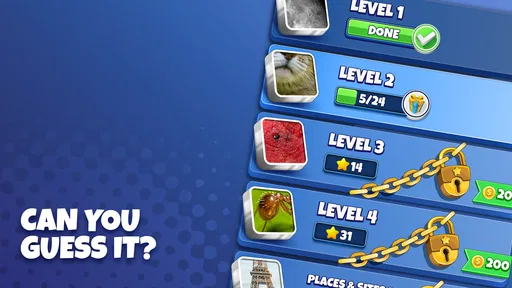
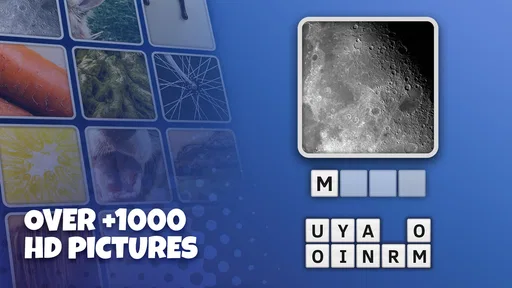
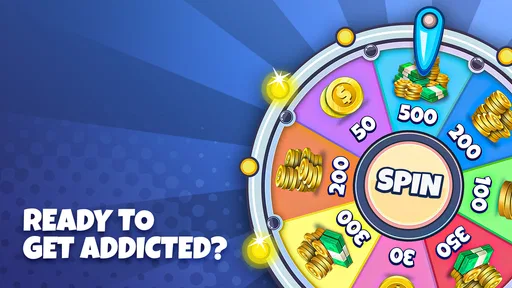
Our Review of Guess it! Zoom Pic Trivia Game
 Analysis by Appyee
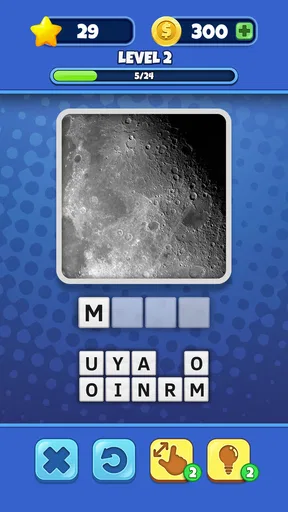
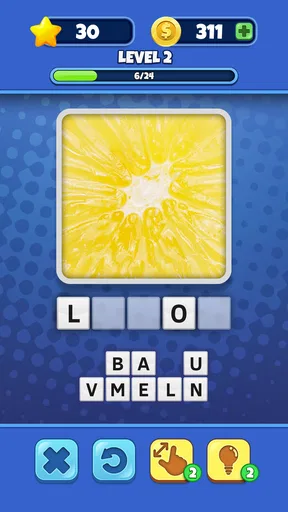
I spent time with Guess it! Zoom Pic Trivia Game as a picture-based trivia game, and its central idea is immediately easy to understand: identify an image, type or choose the answer, and move on to the next challenge. That simplicity makes it approachable, but the zoomed-in format also changes the way I played. I was not only testing my general knowledge; I was paying attention to tiny visual clues, familiar shapes, lettering, colors, and context.
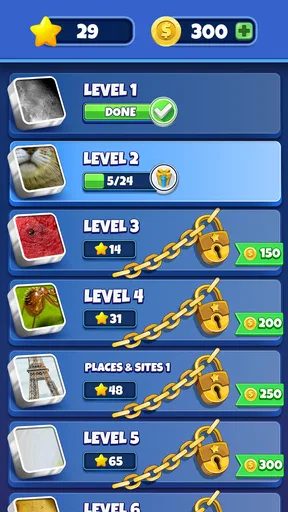
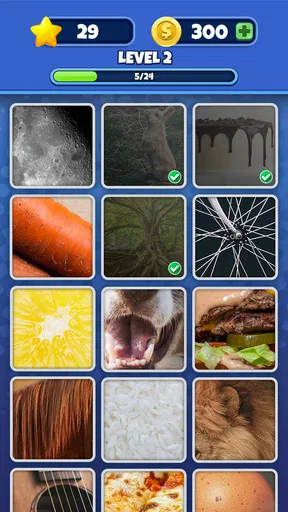
Developed by PrizePool Studios, the game is free to download and aimed at Teen players. It focuses on more than a thousand images involving brands, places, and everyday objects from around the world. That mixture gives it a wider range than a trivia title built around one subject, although it also means the difficulty can feel uneven from one picture to the next. One image may reward instant recognition, while another asks me to make a careful guess from a very limited view.
The game has attracted over a million installs and holds a 4.7 average from around thirty-seven thousand ratings, which suggests that the basic format works for a large audience. I can understand the appeal. It is quick to pick up, suitable for short sessions, and easy to explain to another person. Still, the real question is not whether the concept is clear. It is whether the visual presentation remains comfortable and fair for people with different abilities, different devices, and different playing situations.
How the visual format affects readability and navigation
The strongest part of the experience is the direct relationship between image and answer. I never had to learn a complicated set of rules before starting. The screen asks me to look closely, identify what I recognize, and respond. For a player who prefers visual puzzles over long question-and-answer screens, that is a welcome change from conventional trivia games that rely heavily on reading.
At the same time, a zoomed picture can create a readability problem even when the interface itself is understandable. A brand name may be partly hidden, an object may be shown from an unhelpful angle, or a place may be represented by a detail that looks ordinary without its wider setting. This is an important distinction: the controls can be simple while the actual clue is difficult to interpret. I found that I sometimes knew the general subject but could not confidently identify the exact answer from the visible portion.
That uncertainty can be enjoyable when the clue feels fair. It becomes frustrating when success depends on noticing a small visual detail rather than applying knowledge. I recommend treating the first attempt as an observation phase. Instead of immediately guessing from color alone, I look for text fragments, repeated shapes, distinctive outlines, and clues about location or use. This small habit makes the game feel more like a reasoning challenge and less like random tapping.
Navigation is best suited to players who want a focused activity rather than a large collection of menus. The game’s identity is built around moving through image challenges, so I did not expect the kind of deep organization found in a full quiz platform with separate subject libraries, study modes, or extensive statistics. That is a strength for quick access, but a limitation for anyone who wants to deliberately practice one topic.
People who have difficulty reading small text should pay particular attention to the visual nature of the game. The answer may be obvious from the picture without needing to read much, but some clues can depend on lettering or fine detail. On a smaller phone, the same image may feel more demanding than it does on a larger display. I would test it on the device I plan to use rather than assuming that a clear screenshot or store preview represents the in-game experience.
There is also a useful social advantage here. I can hand the phone to someone else and explain the task in a few seconds. That makes it practical for a family waiting room, a casual gathering, or a short break with a friend. One person can notice the visual clue while another supplies the answer. In that setting, the game becomes less dependent on one player’s eyesight or recognition speed.
Making visual clues easier to reason through
My most effective approach was to separate recognition from recall. First, I described the image to myself: whether it looked like a logo, a landmark detail, a product, or an ordinary object. Then I considered what category of answer would make sense. This is more reliable than staring at the same pixels and hoping the answer suddenly appears.
I also found that changing the distance between my eyes and the screen can help more than repeatedly zooming in mentally. Holding the phone slightly farther away can reveal the overall composition, while bringing it closer can expose lettering or texture. That is not a game feature, but it is a useful way to work with the design instead of fighting it.
For players who become tired when reading or searching, short sessions are preferable. The game’s free entry makes it easy to try a few rounds without committing to a long play period. I would not describe it as a replacement for a structured learning tool, but it can turn spare minutes into light visual practice.
Motor, sensory, and situational considerations
From a motor perspective, the concept is less demanding than games that require rapid movement, repeated swipes, or precise timing. The main action is answering a trivia prompt, so players who prefer calm interaction may find it more comfortable than an action game. That said, the practical experience still depends on how much typing, tapping, or screen manipulation an individual answer requires. Anyone with limited hand movement should try the controls personally before deciding whether it fits their routine.
The absence of fast reflex pressure is valuable for players who need more time to process a visual clue. I could pause mentally, inspect the image, and form an answer without feeling that the challenge was primarily about speed. This makes it more suitable for relaxed play than many competitive quiz alternatives, especially when the goal is to think together rather than race.
Sensory comfort is more complicated. A picture-focused game naturally places a lot of weight on vision. Players with low vision, color-vision differences, light sensitivity, or difficulty distinguishing crowded images may encounter barriers that are not obvious from the simple rules. A clue that relies on subtle color contrast or a small logo detail may be much harder for one person than another, even when both know the subject.
I would approach the game with realistic expectations if visual access is a major concern. The format does not give me a reason to assume that every image has a text-based alternative or that every clue can be solved without seeing fine detail. A friend can help by describing the image aloud, and that shared approach can make the game more inclusive, but it changes the experience from independent play to cooperative play.
Audio sensitivity can matter too, depending on the device environment and the way a person prefers to play. I often keep casual trivia games quiet when I am in public, at work during a break, or around someone who is sleeping. The game’s core value comes from the picture and answer, so I do not need a noisy setting to enjoy the basic challenge. Playing silently also makes it easier to concentrate on the visual clue.
For people who use screen magnification or other device-level adjustments, the result may vary. Enlarging the whole display can make text easier to inspect, but it may also reduce how much of the image is visible at once. That creates a trade-off: better detail in one area versus less context overall. I found that a moderate display adjustment is more useful than making everything as large as possible, because the surrounding shape often helps identify a zoomed picture.
Players with attention differences may appreciate the narrow task: look, interpret, answer. The same narrowness can become tiring if every round demands sustained visual scanning. I would use the game in small blocks rather than treating it as a long endurance session. A few puzzles during a commute or while waiting for an appointment make more sense to me than playing until visual fatigue sets in.
Where it works well in everyday life
A realistic use case is a short train ride with a friend. One person holds the phone, both look at the image, and each offers a possible answer. If the clue is difficult, the conversation becomes part of the entertainment: one player may recognize the type of object while the other remembers the brand or place. This cooperative style also helps when one person has stronger visual recognition and the other has broader general knowledge.
It can work during a family break as well, especially when people do not want to learn a complicated multiplayer system. Younger players and adults can approach the same image differently, and that difference creates discussion. However, the Teen content rating means I would still use my judgment about handing it to younger children rather than assuming it is designed for every age group.
The game is less convenient in situations where the screen cannot be held steady, such as walking, standing on a crowded bus, or dealing with bright sunlight. Those conditions make close inspection harder and can turn a thoughtful puzzle into a frustrating squint. A traditional spoken trivia game may be better when the phone is difficult to view, while a text-heavy quiz may be preferable for someone who can read comfortably but struggles with image recognition.
It is also not the ideal choice for a player seeking serious competition. The appeal is in recognition and guessing, not in a clearly specialized knowledge ladder. Someone who wants geography-only questions, a formal head-to-head system, or detailed progress tracking may get more value from a dedicated alternative. I prefer this title when I want variety and a low barrier to entry rather than a disciplined quiz routine.
Where the experience still creates barriers
The biggest barrier is the dependence on visual interpretation. Even when the answer is technically familiar, the cropped or enlarged presentation can hide the information needed to identify it. This may feel clever to some players and arbitrary to others. My rule is simple: if I can explain why the clue points toward an answer, I consider it satisfying; if I am only cycling through guesses, the challenge has lost some of its value.
Another limitation is the possibility of uneven difficulty across subjects. Brands, places, and objects do not test the same kind of knowledge. A player who knows international landmarks may struggle with commercial logos, while someone familiar with products may not recognize a distant location from a small visual detail. That variety keeps the game from becoming predictable, but it can also make progress feel dependent on personal background rather than general trivia skill.
The free price is helpful for trying the game, but the presence of optional purchases ranging from ninety-nine cents to forty-nine dollars and ninety-nine cents per item is worth noticing. I would decide in advance whether I am comfortable spending anything, particularly if hints or other conveniences become tempting during a difficult run. Free access lowers the entry barrier, but it does not automatically mean the entire experience will remain cost-free for every play style.
The current release is version 2.0.3, and it requires Android 6.0 or later. That makes checking the phone’s operating system a sensible first step for anyone using an older device. Compatibility is only one part of access, though. Screen size, brightness, touch responsiveness, and the player’s ability to inspect images may matter just as much as the operating system.
I also would not choose this game as the only activity for a group with very different visual abilities. It can be adapted through spoken descriptions and teamwork, but that requires patience and a willingness to share control of the device. A spoken quiz, audio game, or board game with tactile components may provide a more naturally equal experience for that group.
There is a psychological barrier too: image guessing can make players feel that they either recognize something instantly or have no chance at all. I found it more enjoyable when I accepted that not every round would be solvable from memory. Looking for categories and visual relationships helped, but some puzzles still depend on familiarity with a brand, place, or object. Players who dislike uncertain guesses may prefer a trivia format with longer clues and more context.
An inclusive verdict for the right kind of player
My overall impression is that Guess it! Zoom Pic Trivia Game offers a clear, approachable form of visual trivia, but its accessibility depends heavily on the person holding the phone. It is strongest for players who enjoy identifying images, can comfortably inspect a small screen, and want short, informal sessions. It is also a good conversation starter because two people can solve one picture together without needing a complicated setup.
I would recommend it to a friend who likes brands, places, and everyday-object puzzles and does not mind occasional uncertainty. The free download makes experimenting easy, and the game’s broad subject mix prevents every round from feeling identical. Its 4.7 average and large installed audience reflect an experience that many players find appealing, although popularity should not be mistaken for universal suitability.
I would be more cautious recommending it to someone with significant visual access needs, strong sensitivity to visual clutter, or a preference for fully explained questions. The game can be made more inclusive through verbal description, device adjustments, shared play, and sensible breaks, but those workarounds are not the same as designing every challenge for every ability. A conventional text trivia app may be better for a reader who wants explicit clues, while an audio-first option may be a better fit for someone who cannot rely on detailed images.
My practical advice is to begin with a short session, keep the screen at a comfortable brightness, and avoid judging your trivia ability by the hardest image. Describe each clue before guessing, use a friend’s perspective when available, and decide how you want to handle optional spending before it becomes part of the moment. These small choices reduce frustration and make the visual format easier to enjoy.
In the end, I see this as a focused picture-guessing game rather than a complete trivia platform. Its best quality is the quick shared moment of recognition; its main weakness is that the same visual focus can exclude players who need more context or less dependence on fine detail. If that trade-off matches how you play, PrizePool Studios’ game is an entertaining free starting point. If equal independent access is the priority, I would look for a trivia alternative built around text, audio, or more flexible clue presentation.
Verdict
Strengths of Guess it! Zoom Pic Trivia Game
- Quick rounds make it easy to play during short breaks.
- Simple zoom-and-guess format is accessible for most players.
- Varied images help keep the trivia experience from feeling repetitive.
- Hints can help players progress when an image is especially difficult.
- Works well as a casual group game for comparing guesses.
Limitations of Guess it! Zoom Pic Trivia Game
- Some puzzles may feel too easy for experienced trivia players.
- Repeated image styles can make later rounds feel predictable.
- Hint availability may be limited without watching ads or spending currency.
- Progression can become repetitive after extended play sessions.
- Players who dislike visual trivia may find the gameplay too narrow.
Other Releases by PrizePool Studios
View All
Logo Quiz - World Trivia Game
Trivia4.8

Who is it? Celeb Quiz Trivia
Trivia4.8

Flags Quiz - Guess The Flag
Trivia4.7

Roku Remote Control & TV Cast
Tools4.8
Similar Picks in This Category
View All
Millionaire 2026 Quiz & Trivia
Quiz & Trivia Games by Submarine Apps4.5

Brain Test 2: Tricky Stories
Unico Studio4.7

Trivia Crack: Brain Quiz Games
etermax4.4

QuizzLand. Quiz & Trivia game
Quiz & Trivia Games by Mno Go Apps4.8

Brain Test: Tricky Puzzles
Unico Studio4.7

Logo Quiz
bubble quiz games4.5
Frequently Asked Questions
What is Guess it! Zoom Pic Trivia Game?
Guess it! Zoom Pic Trivia Game is a visual quiz where you identify images that are initially shown in a highly zoomed-in or partially hidden view. As you make progress, more of the picture becomes visible, helping you recognize the answer. The game is designed for short, casual sessions and tests observation, memory, general knowledge, and your ability to notice small visual details.
How do you play Guess it! Zoom Pic Trivia Game?
Each challenge presents a close-up image and asks you to guess what it represents. You typically choose or enter an answer, depending on the mode available in the version you install. If the picture is difficult to recognize, you can use the gradual clues provided by the game, although some assistance may consume in-game resources. Correct answers allow you to continue through additional puzzles and categories.
Is Guess it! Zoom Pic Trivia Game suitable for children?
The game can be enjoyable for children, teenagers, and adults because its core gameplay is simple and does not require advanced controls. However, suitability depends on the image categories, advertising, and any optional purchases included in the installed version. Parents should review the app-store rating and privacy information, especially if children will play independently or use features connected to purchases or external links.
Does Guess it! Zoom Pic Trivia Game require an internet connection?
An internet connection may be needed for certain functions, such as loading advertisements, synchronizing progress, downloading updated content, or using online features. Basic puzzles may work offline in some versions, but this can vary by device and app update. Before relying on offline play, it is best to test the game after disabling Wi-Fi and mobile data to see which features remain available.
Is Guess it! Zoom Pic Trivia Game free to download and play?
Guess it! Zoom Pic Trivia Game is generally available as a free download, but free access may be supported by advertisements, optional hints, or in-app purchases. Some features or resources could require payment, and repeated use of clues may encourage additional purchases. Check the official Google Play or App Store listing for the current pricing, subscription details, age rating, and available purchase controls before downloading.
Play our best games!


